

Orphan Pages: Why They Hurt Your SEO and How to Find Them
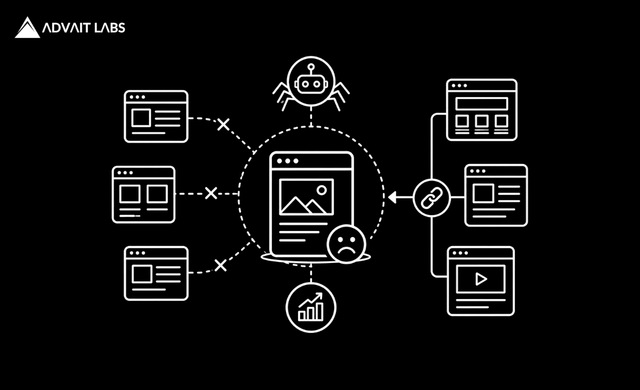
A website can have hundreds or even thousands of pages, but not every page is properly connected to the rest of the site. Some pages may exist, be accessible through their URLs, and even contain useful content, yet have no internal links pointing to them.
These pages are known as Orphan Pages.
Orphan Pages are an often-overlooked technical SEO issue. They can make it harder for search engines to discover and understand certain pages and can also create a poor user experience when visitors have no natural path to reach important content.
Finding and fixing orphan pages should therefore be part of a regular SEO audit, particularly for large websites, ecommerce sites, blogs, news websites, and websites that frequently publish new content.
At Advait Technology Labs, we help businesses improve their organic visibility through technical SEO, content optimization, internal linking, website design and development, and broader digital marketing strategies. In this guide, we’ll explain what orphan pages are, how they differ from other types of pages, why they matter for SEO, and how to find and fix them.
What Are Orphan Pages?
Orphan Pages are website pages that have no internal links pointing to them from other pages on the same website.
For example, imagine a website has these pages:
Home → Services → SEO Services
But the website also contains a separate page:
/technical-seo-guide/
If no other page on the website links to /technical-seo-guide/, that page may be considered an orphan page.
The page can still potentially be discovered through:
- An XML sitemap
- External backlinks
- Direct URL access
- Browser history
- Other sources
But there is no internal link connecting it to the site’s normal navigation structure.
Why Do Orphan Pages Matter for SEO?
Internal links help search engines discover pages and understand relationships between different pieces of content.
When a page has no internal links pointing to it, several issues can arise.
1. Discovery Can Become More Difficult
Search engines can discover URLs through multiple methods, including sitemaps and external links. Therefore, an orphan page is not automatically unindexed.
However, having no internal links removes an important discovery pathway.
2. The Page Receives No Internal Link Equity
Internal links can help distribute authority and relevance throughout a website.
An orphan page doesn’t receive internal links from other pages, meaning it misses an opportunity to benefit from the site’s internal linking structure.
3. Users May Struggle to Find the Page
If users cannot reach a page through relevant navigation or content, the page may provide little practical value even if it ranks in search results.
4. Important Content Can Become Isolated
A business may have created an excellent service page, guide, or blog post, but if it isn’t connected to relevant pages, its importance may not be clearly communicated within the site’s architecture.
Are Orphan Pages Always Bad?
No.
An orphan page isn’t automatically a problem.
Some pages may intentionally exist without internal links.
For example:
- Landing pages for advertising campaigns
- Temporary promotional pages
- Tracking-related pages
- Special-purpose resources
- Certain conversion pages
The key question is:
Should this page be discoverable and connected within the website’s normal structure?
If the answer is yes, leaving it orphaned is usually worth addressing.
What Causes Orphan Pages?
Orphan pages can appear for many reasons.
1. Website Redesigns
During redesigns, pages may be removed from navigation while their URLs remain live.
2. Content Publishing
A new blog post may be published without adding links from older relevant articles.
3. Changes to Site Architecture
Moving categories or restructuring navigation can disconnect existing pages.
4. Deleted or Updated Content
When a page containing internal links is removed, the pages it linked to may become orphaned.
5. CMS Changes
Changes to categories, tags, menus, or templates can unintentionally remove internal links.
6. Landing Pages
Paid advertising campaigns often use standalone landing pages that aren’t intended to be part of the site’s regular navigation.
These aren’t necessarily SEO problems.
7. Old Content
Older blog posts can gradually become disconnected as newer content replaces or links around them.
How to Find Orphan Pages
Finding orphan pages usually requires comparing multiple URL sources.
No single tool necessarily provides the complete picture.
A useful process is to compare:
Website Crawl + XML Sitemap + Google Search Console + Analytics + Backlinks
Method 1: Use a Website Crawler
SEO crawling tools can identify URLs discovered during a crawl.
Tools such as Screaming Frog SEO Spider can be used to crawl a website and analyze internal links.
The basic process is:
- Crawl your website.
- Export URLs.
- Review internal link data.
- Identify pages with zero internal links.
- Compare them against your sitemap and other URL sources.
Pages that appear in your sitemap but aren’t discovered through internal links deserve further investigation.
Method 2: Check Your XML Sitemap
Your XML sitemap contains URLs that you want search engines to know about.
Export the URLs from your sitemap and compare them with the URLs discovered through an internal website crawl.
For example:
Sitemap URLs: 1,000
URLs discovered through internal links: 950
The remaining URLs require investigation.
They aren’t necessarily all orphan pages, but they may contain pages that aren’t properly connected internally.
Method 3: Use Google Search Console
Google Search Console can provide useful information about URLs Google has discovered, indexed, or encountered.
Look at:
- Pages
- Indexing status
- Sitemap reports
- Performance data
If a URL is receiving organic impressions or clicks but has no internal links, it deserves attention.
However, Google Search Console alone may not provide a complete list of every orphan page on your website.
Method 4: Compare Analytics Data
Analytics data can help identify pages that receive traffic but aren’t connected through your site’s internal architecture.
For example:
A blog page may receive visitors from Google but have no internal links from other pages.
That could indicate an opportunity to improve its position within the content structure.
Method 5: Check Backlinks
External backlinks can lead users and search engines to pages that aren’t internally linked.
A page with backlinks but no internal links may still have SEO value.
Instead of deleting it automatically, evaluate:
- Traffic
- Rankings
- Backlinks
- Conversions
- Content quality
- Business relevance.
How to Fix Orphan Pages
Once you’ve identified orphan pages, don’t immediately delete them.
First determine whether each page deserves to remain on the website.
1. Add Relevant Internal Links
If the page provides useful information, add contextual links from relevant pages.
For example:
SEO Services → Technical SEO → Technical SEO Guide
This creates a logical relationship between the pages.
2. Link From High-Authority Pages
If possible, link to important pages from pages that already have strong visibility and relevant internal links.
For example:
Homepage → Core Service → Supporting Guide
This can help integrate the page into the broader site structure.
3. Use Topic Clusters
A strong content architecture can connect related pages.
For example:
Pillar Page
Digital Marketing Services
↓
Supporting Pages
- SEO Services
- Google Ads
- Social Media Marketing
- Content Marketing
- Local SEO
↓
Supporting Articles
- Technical SEO
- Keyword Research
- Google Ads Automation
- Local Citations
This structure gives users and search engines clearer pathways through your content.
4. Add Links From Older Content
Don’t only add links to new pages.
Review older relevant articles and add contextual links to valuable orphan pages.
This can help integrate older and newer content.
5. Update Navigation Where Appropriate
If an orphan page represents an important service, category, or core resource, it may deserve a place in:
- Main navigation
- Category navigation
- Footer navigation
- Related content sections
Don’t add every page to the main menu. Navigation should remain useful for users.
6. Redirect Pages That Are No Longer Necessary
If an orphan page is outdated, redundant, or replaced by a better URL, consider whether a relevant 301 redirect is appropriate.
For example:
Old Page → Relevant Updated Page
A redirect can be preferable to keeping a low-value page alive.
7. Delete Pages With No Purpose
Some orphan pages genuinely don’t need to exist.
Examples may include:
- Outdated temporary pages
- Duplicate content
- Test pages
- Obsolete campaigns
- Thin pages with no strategic value
But deletion should be evaluated carefully, especially when a URL has traffic, backlinks, rankings, or conversions.
Final Thoughts
Orphan Pages aren’t automatically harmful, but they can represent missed opportunities when valuable pages aren’t connected to the rest of your website.
A strong SEO strategy should ensure that important content has a logical place within the site’s architecture.
Regularly comparing crawl data, sitemap URLs, Search Console information, analytics, and backlink data can help identify pages that deserve attention.
Once an orphan page is identified, the appropriate solution may be to:
- Add internal links
- Improve site navigation
- Connect it to a content cluster
- Redirect it
- Remove it
The right decision depends on the page’s purpose, quality, traffic, backlinks, rankings, and business value.
By making internal linking part of your regular content and SEO workflow, you can reduce orphan pages and build a website that’s easier for both users and search engines to navigate.
Visit Advait Technology Labs Today!
Frequently Asked Questions
1. What is an orphan page in SEO?
An orphan page is a website page that has no internal links pointing to it from other pages on the same website. It may still be accessible through a sitemap, external links, or its direct URL.
2. Are orphan pages bad for SEO?
Not always. Some pages are intentionally isolated, such as certain advertising landing pages. However, valuable pages that should be part of the site’s structure can benefit from relevant internal links.
3. How do I find orphan pages?
You can identify potential orphan pages by comparing a website crawl with URLs from your XML sitemap, Google Search Console, analytics data, and backlink sources.
4. How do you fix an orphan page?
If the page is valuable, add relevant internal links from other pages. Depending on the situation, you can also improve navigation, connect the page to a content cluster, redirect an outdated page, or remove a page that has no useful purpose.
