

Indexing vs Crawling: What Is the Difference?
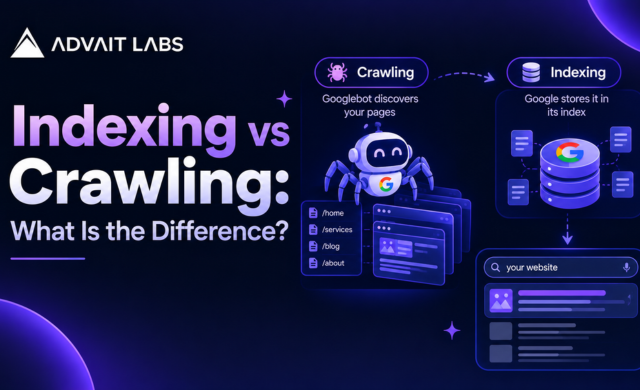
Understanding indexing vs crawling is important if you want to know how search engines discover, process, and display web pages. These two SEO terms are often used together, but they describe different stages of the search engine process.
A page can be crawlable without being indexed. Similarly, a URL can be known to a search engine without appearing in search results. Knowing the difference helps you investigate technical SEO issues more accurately instead of assuming that every visibility problem is an indexing problem.
This guide explains crawling vs indexing in simple terms, how the two processes work, what can prevent them, and how tools such as Google Search Console can help you check the status of individual URLs.
Need help reviewing your website’s technical SEO setup? Connect with Advait Labs in Hyderabad to discuss crawlability, indexing, and website structure.
What Is Crawling in SEO?
Crawling is the process through which search engine crawlers discover and access web pages.
A crawler can discover a URL through several paths, including links between pages, previously known URLs, or sitemap information. Once a crawler reaches a page, it can retrieve the page content and examine elements such as links, text, and other accessible resources.
Think of crawling as visiting a webpage to understand what is there.
How Does Website Crawling Work?
The crawling process can be simplified into these steps:
- A search engine discovers a URL.
- The crawler determines that the URL can be accessed.
- The crawler requests the webpage.
- The page and accessible resources are retrieved.
- The crawler can discover additional URLs through links and other signals.
The ability of search engine crawlers to access a page is commonly described as crawlability.
What Can Affect Crawlability?
Several technical elements can affect whether a page can be accessed properly.
These include:
- Robots.txt rules
- Server response problems
- Broken links
- Incorrect redirects
- URL structure
- Website architecture
- Pages requiring inaccessible resources
- Technical configuration problems
A crawlability problem means the search engine may have difficulty accessing or processing the page. That is different from a page simply being excluded from an index.
What Is Indexing in SEO?
Indexing is the process of storing and organizing information about webpages that a search engine has processed.
After crawling a page, a search engine can evaluate its content and other available signals before determining whether the URL should be included in its searchable index.
Think of indexing as deciding where the information belongs in the search engine’s library.
A page being crawled does not automatically mean that it will be indexed.
How Does Search Engine Indexing Work?
A simplified indexing process looks like this:
URL discovery → Crawling → Processing → Indexing → Search result eligibility
During processing, search engines can examine the page’s content, links, technical information, and other signals.
Technical elements can also influence how a page is handled. For example, a noindex tag tells compatible search engines that the page should not be included in their index.
This is why crawling and indexing should be treated as separate technical SEO concepts.
Indexing vs Crawling: Key Differences
The easiest way to understand indexing vs crawling is to compare their purposes.
| Crawling | Indexing |
| Involves discovering and accessing URLs | Involves processing and storing information about pages |
| Focuses on whether a page can be accessed | Focuses on whether a page is included in the search index |
| Can be affected by crawlability issues | Can be affected by indexing directives and content-related issues |
| Uses crawlers to retrieve webpages | Organizes processed page information for search |
| A page can be crawled without being indexed | A page generally needs to be discovered and processed before it can be considered for indexing |
Crawling Does Not Equal Indexing
One of the most common SEO misunderstandings is assuming that a successful crawl means the page has been indexed.
It does not.
For example, imagine a new service page has been published. A crawler accesses the page successfully, but the page has a noindex directive. The page may be crawlable while remaining excluded from the index.
This distinction is particularly useful when diagnosing why a website is not indexed.
Crawlability vs Indexability
Crawlability asks:
Can a search engine crawler access the page?
Indexability asks:
Can the page be included in the search index?
These questions are related, but they are not interchangeable.
A page might have good crawlability but still have an indexing issue. For example, an unintended noindex directive can prevent a page from being included even when the page itself is accessible.
Common Indexing Issues
Common areas to investigate include:
- Noindex tags
- Canonical URL configuration
- Duplicate or substantially similar pages
- Redirected URLs
- Soft error pages
- Incorrect page status codes
- Pages with little useful content
- Website architecture problems
- Technical SEO configuration issues
The important point is to identify the actual reason instead of treating every missing URL as a crawling problem.
How Google Search Console Helps
Google Search Console can be useful when investigating crawling and indexing.
The URL Inspection Tool allows website owners to inspect information about an individual URL and understand its current search-related status.
For example, you can use it when:
- A newly published page is not appearing in search
- You want to check a specific URL
- A page has recently been changed
- You are investigating an indexing issue
- You want to understand whether a URL is available for indexing
Search Console can also provide information about indexing status and pages with particular technical issues.
What Should You Check First?
When a page is missing from search, follow a logical troubleshooting sequence:
- Confirm that the URL is correct.
- Check whether the page loads normally.
- Review crawlability.
- Check for a noindex directive.
- Review canonical configuration.
- Check for duplicate content.
- Inspect the URL in Search Console.
- Review the site’s XML sitemap.
- Look for technical SEO issues affecting the page.
This approach is more useful than repeatedly requesting indexing without understanding the underlying issue.
If your website has URLs that are being crawled but not indexed, a structured technical SEO review can help identify where the process is breaking down. Talk to Advait Labs about your website’s crawlability and indexability setup.
Does an XML Sitemap Help With Indexing?
An XML sitemap provides search engines with information about URLs that a website considers important to discover.
It can be especially useful for large websites, recently updated websites, or websites with complex structures.
However, an XML sitemap should not be treated as a guarantee that every listed URL will be indexed.
A sitemap supports URL discovery. Indexing remains a separate process.
For this reason, submitting a sitemap should be part of a broader technical SEO setup rather than the only solution to an indexing problem.
How Duplicate Content Relates to Indexing
Duplicate content can make indexing more complicated when multiple URLs contain substantially similar information.
For example, a website might accidentally create several URLs that display nearly identical versions of a page. Search engines may need to determine which version is the appropriate URL to represent.
Technical SEO elements such as canonical configuration can help communicate the preferred version.
It is also useful to distinguish duplicate content from plagiarism. A plagiarism check can help identify copied wording, but a plagiarism checker itself is not an indexing control. Technical indexing decisions involve much more than whether content matches another webpage.
Why a Page May Be Crawled but Not Indexed
If a page has been crawled but does not appear in search, several possibilities should be investigated.
Check the Noindex Directive
Look for a noindex directive in the page’s HTML or related configuration. An accidental noindex tag can prevent a page from being included in the index.
Review Canonical Signals
Check whether the page points to another URL as its canonical version. An unexpected canonical configuration can affect how the page is represented.
Examine Duplicate Pages
Look for other URLs with substantially similar content. This can occur through parameters, multiple URL versions, filters, or duplicated page templates.
Check Technical SEO Issues
Review status codes, redirects, server accessibility, internal links, and other technical elements that could affect how the page is processed.
Crawling vs Indexing: Which One Should You Fix First?
There is no universal rule that one should always be fixed before the other.
Instead, identify the specific problem.
If a crawler cannot access a page, investigate crawlability first. If the page is accessible but is not included in the index, investigate indexability and indexing signals.
This distinction saves time and creates a clearer technical SEO troubleshooting process.
A useful mental model is:
Crawling = Can the search engine access it?
Indexing = Has the page been processed and included in the search index?
Ranking = Where might the page appear for a particular search?
These are three different concepts. Improving one does not automatically determine the outcome of the others.
FAQs
What is the difference between crawling and indexing?
Crawling is the process of discovering and accessing webpages. Indexing is the process of processing and storing information about webpages for possible inclusion in a search engine’s index.
Can a page be crawled but not indexed?
Yes. A page can be successfully crawled but not appear in the search index. Technical directives, canonical signals, duplicate content, and other indexing considerations can affect how a page is handled.
What is crawling in SEO?
Crawling in SEO refers to the process through which search engine crawlers discover and access webpages so their content and resources can be processed.
What is indexing in SEO?
Indexing in SEO refers to the process of processing and storing information about webpages in a search engine’s index so they can be considered for search results.
How can I check if a page is indexed?
You can investigate an individual URL through the URL Inspection Tool in Google Search Console and review the available indexing information for that URL.
Does an XML sitemap guarantee indexing?
No. An XML sitemap provides information about URLs that can help with discovery, but listing a URL in a sitemap does not guarantee that the URL will be indexed.
Does a noindex tag affect crawling?
A noindex directive concerns indexing rather than simply defining whether a page can be crawled. Crawlability and indexability should therefore be checked separately when troubleshooting a page.
Is duplicate content the same as plagiarism?
No. Duplicate content refers to substantially similar content across URLs, while plagiarism generally refers to using another source’s content without appropriate originality or attribution. A plagiarism check and an indexing investigation serve different purposes.
