

How to Find and Fix Redirect Chains
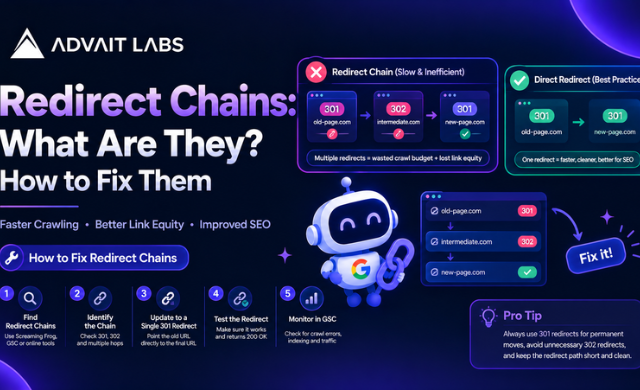
A URL redirect is useful when a page has moved, a URL has changed, or an old page needs to point visitors to a new destination. The problem starts when one URL redirects to another URL that redirects somewhere else.
This creates a redirect chain.
For example:
Page A → Page B → Page C
Instead of taking users and search engines directly from Page A to Page C, the request passes through multiple URLs. During a technical SEO audit, finding these chains can help you understand how URLs are connected and where unnecessary redirects exist.
In this guide, Advait Labs explains how to find redirect chains, understand why they occur, and clean them up without disrupting your website’s URL structure.
Need help reviewing your website’s technical SEO? Talk to Advait Labs in Hyderabad about a structured website and redirect audit.
What Is a Redirect Chain?
A redirect chain happens when one URL redirects to another URL, which then redirects to another URL before reaching the final destination.
A simple example looks like this:
↓ 301 redirect
↓ 301 redirect
Here, Page A does not point directly to Page C. It passes through Page B first.
A redirect chain is different from a single redirect.
Single redirect
Old URL → Final URL
Redirect chain
Old URL → URL 2 → URL 3 → Final URL
The goal of a redirect audit is not to remove every redirect. Redirects can be necessary. The focus is identifying unnecessary steps and making the URL path easier to manage.
Redirect Chain vs Redirect Loop
These two issues are often confused.
A redirect chain eventually reaches a final URL after passing through one or more intermediate URLs.
For example:
A → B → C
A redirect loop occurs when URLs keep redirecting between each other without reaching a final page.
For example:
A → B → A
A loop can prevent the requested page from loading correctly. A chain, on the other hand, may eventually reach the intended destination but contain unnecessary redirect steps.
Understanding the difference makes troubleshooting much easier.
Why Do Redirect Chains Happen?
Redirect chains usually appear after changes to a website’s URL structure.
Website migrations
During a migration, old URLs may be redirected to new URLs. If another URL later replaces the destination, the original redirect may remain unchanged.
For example:
Old URL → Migration URL → New URL
The chain can continue growing when further URL changes are made.
Multiple URL changes
A page may move from one location to another several times.
For example:
/services/seo
becomes:
/digital-marketing/seo
and later becomes:
/services/search-engine-optimisation
If each change creates another redirect, the earlier URLs can form a chain.
HTTP to HTTPS changes
A website may also contain redirects associated with protocol changes.
For example:
HTTP URL → HTTPS URL
When combined with other redirects, additional steps can appear.
Internal links pointing to redirected URLs
Sometimes the redirect itself is not the main issue. The website may still contain internal links pointing to an old URL.
Instead of:
Internal link → Final page
the path becomes:
Internal link → Redirect → Final page
Updating internal links to point directly to the final URL can simplify the structure.
Multiple redirect rules
Redirect rules can be added through different website systems, plugins, servers, or configuration files. When these rules overlap, unexpected redirect paths can develop.
This is why a redirect audit should look at the complete URL path rather than checking individual redirects in isolation.
How to Find Redirect Chains
Finding redirect chains requires checking how URLs respond and where they eventually lead.
Step 1: Create a list of URLs
Start with the URLs that need to be reviewed.
Your list can include:
- Existing website URLs
- Older URLs
- URLs from previous website versions
- URLs listed in an XML sitemap
- URLs receiving internal links
- URLs identified during a technical SEO audit
- URLs from previous migrations
A complete URL list makes the audit easier to organise.
Step 2: Check the redirect path
Test each URL and record every redirect between the starting URL and the final destination.
For example:
| Starting URL | Redirect 1 | Redirect 2 | Final URL |
| /old-page | /service-page | /seo-services | /seo-services |
This immediately shows that the starting URL does not reach the final page directly.
Step 3: Check HTTP status codes
Pay attention to the status code returned by each URL.
Common redirect-related status codes include:
- 301: Permanent redirect
- 302: Temporary redirect
- 307: Temporary redirect
- 308: Permanent redirect
The important part of an audit is understanding how these responses are connected rather than looking at one status code alone.
Step 4: Check the final destination
A redirect should eventually lead somewhere meaningful.
Check whether the final URL:
- Loads correctly
- Returns the expected status
- Contains the intended content
- Is accessible to users
- Is the correct replacement for the original URL
- Is not another redirect
If the final URL redirects again, continue tracing the path.
Step 5: Check internal links
Search the website for internal links pointing to URLs that redirect.
For example:
Blog → Old service URL → New service URL
can often become:
Blog → New service URL
This reduces an unnecessary step in the visitor’s path.
Planning a technical SEO cleanup? Advait Labs can help you review redirect paths, internal URLs, indexing signals, and other technical SEO issues as part of a structured website audit.
How to Fix Redirect Chains
Once you identify a redirect chain, the solution is usually to review the redirect logic and update the relevant URLs.
1. Redirect the original URL directly to the final URL
Suppose the current chain is:
A → B → C
If C is the correct final destination, the redirect can be mapped as:
A → C
The intermediate redirect from A to B can then be reviewed and removed where appropriate.
2. Update internal links
If internal links point to redirected URLs, update them to point directly to the final destination.
Instead of:
Website page → Old URL → Final URL
use:
Website page → Final URL
This is particularly useful when many internal pages still reference an older URL.
3. Review old redirect rules
Look for redirect rules created during:
- Website redesigns
- Domain changes
- URL restructuring
- CMS migrations
- HTTPS implementation
- Content restructuring
Some rules may no longer be necessary.
4. Avoid creating a new chain while fixing an old one
A common mistake is adding another redirect without reviewing the existing rules.
Before creating a new redirect, check:
Where does this URL currently go?
Then check:
Where should it ultimately go?
This simple process helps prevent additional redirect layers.
5. Check redirect loops separately
During the audit, look for loops as well as chains.
For example:
A → B → C → A
If the URL never reaches a final destination, the redirect rules need to be reviewed before making further changes.
How Google Search Console Helps With Redirect Audits
Google Search Console can be useful when reviewing how URLs are handled during the search engine indexing process.
URL Inspection Tool
The URL Inspection Tool allows you to examine an individual URL and review available information about its current search visibility and indexing status.
When investigating a redirect issue, inspect both:
- The original URL
- The intended final URL
This can help you distinguish between a redirect problem and a separate indexing issue.
Indexing status
A redirect chain and an indexing problem are not necessarily the same thing.
If a page is not appearing as expected, check whether the URL:
- Redirects somewhere else
- Has a noindex directive
- Is accessible for crawling
- Has another URL selected as the relevant page
- Is included correctly in the site’s URL structure
This prevents you from treating every indexing issue as a redirect issue.
Check Your XML Sitemap After Fixing Redirects
Your XML sitemap should be reviewed after major URL changes.
If an XML sitemap contains URLs that redirect elsewhere, review whether those URLs should remain there.
The sitemap audit should focus on the URLs you want search engines to discover and process as current website pages.
A redirecting URL may indicate that the sitemap has not been updated after a URL change.
What About Duplicate Content and Noindex Tags?
Redirect chains can appear alongside other technical SEO issues, but they should be diagnosed separately.
Duplicate content
If several URLs contain substantially similar content, first determine whether they represent different pages or different versions of the same page.
A redirect may be appropriate in some URL restructuring situations, while other situations may require a different technical solution.
Noindex tags
A noindex directive tells search engines not to include a page in their search index.
If a page has an unexpected indexing status, check its technical directives separately from its redirect path.
The important point is simple: do not assume that every indexing problem is caused by a redirect.
Redirect Chain Audit Checklist
Use this checklist when reviewing your website:
- List important old and current URLs
- Trace each redirect to its final destination
- Record every HTTP status code
- Identify URLs with multiple redirect steps
- Check for redirect loops
- Check internal links pointing to redirects
- Review redirect rules
- Check the final destination URL
- Review XML sitemap URLs
- Use Google Search Console for URL inspection
- Check indexing status
- Review noindex directives separately
- Check for duplicate URL versions
- Re-test URLs after changes
- Document the final redirect mapping
Are Redirect Chains a Technical SEO Issue?
Redirect chains are primarily a technical SEO and website architecture issue.
They are also a useful part of a broader technical audit because redirect behaviour is connected to URL structure, internal linking, migrations, indexing, and website maintenance.
However, a redirect chain should not automatically be treated as the cause of every SEO problem.
A proper audit looks at the complete technical picture before deciding what needs to change.
Should You Check Redirects After a Website Migration?
Yes, redirect mapping should be part of the migration process.
Before launching a new website, prepare a list of old URLs and their intended new destinations.
After the migration:
- Test important old URLs.
- Trace their redirect paths.
- Confirm the final destination.
- Check internal links.
- Review the XML sitemap.
- Inspect important URLs in Google Search Console.
- Check indexing status.
- Re-test after technical changes.
This creates a more organised approach to managing URLs during a website transition.
Final Thoughts
Redirect chains are easy to overlook because the final page may still load successfully. The real issue becomes visible when you trace the complete path from the original URL to the final destination.
The best approach is straightforward: find the chain, identify the correct final URL, review the redirect rules, update internal links, and test the result.
Redirect management should also be considered alongside indexing, XML sitemaps, internal linking, duplicate URLs, and other technical SEO elements.
For businesses managing large websites, regular technical audits can make URL changes easier to track and maintain.
Looking for technical SEO support in Hyderabad? Advait Labs can help you review redirect chains, website architecture, indexing issues, and other technical SEO requirements.
FAQs
How do I find redirect chains?
You can find redirect chains by tracing a URL from its original address through every redirect until it reaches the final destination. Record each URL and HTTP status code to identify unnecessary redirect steps.
What is an example of a redirect chain?
A simple example is:
URL A → URL B → URL C
Here, URL A redirects to URL B, and URL B redirects to URL C. URL C is the final destination.
What is the difference between a redirect chain and a redirect loop?
A redirect chain eventually reaches a final URL. A redirect loop continuously sends requests between URLs without reaching a final destination.
How do I fix a 301 redirect chain?
First, identify the correct final URL. Then review the existing redirect rules and, where appropriate, change the original URL to redirect directly to the final destination. Internal links should also be updated to the final URL.
Can Google Search Console find redirect chains?
Google Search Console can help you inspect individual URLs and review available indexing information. For a complete redirect-chain audit, you should also trace the URL paths and review the website’s redirect configuration.
Should redirected URLs be in an XML sitemap?
Review sitemap URLs after redirect changes. The sitemap should be maintained around the URLs that represent the current website structure rather than outdated URLs that have been replaced.
Do redirect chains affect indexing?
A redirect chain is one of several technical factors that can be reviewed when investigating URL and indexing behaviour. If a page has an unexpected indexing status, also check crawlability, redirects, noindex directives, and other URL signals.
How often should I check for redirect chains?
Check redirects whenever you make significant URL changes, redesign a website, migrate a domain, restructure content, or modify the site’s URL architecture. A periodic technical SEO audit can also identify redirects that have accumulated over time.
