

What Is a Canonical URL? Why It Matters for SEO
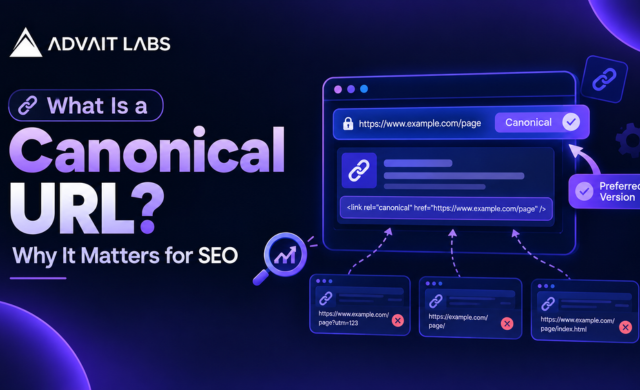
Have you ever found the same webpage available through several different URLs? For example, a product page might load with tracking parameters, a category path, or slightly different URL variations. To a user, these pages may look identical. To search engines, they can appear as separate URLs that need to be evaluated.
This is where a canonical URL becomes important.
A canonical URL tells search engines which version of a group of similar or duplicate pages you prefer to treat as the main version. It can help Google understand your preferred URL, consolidate signals, and reduce confusion caused by duplicate URLs.
In this guide, Advait Labs explains what a canonical URL is, how the canonical tag works, when you should use it, common implementation mistakes, and how to check canonicalization using Google Search Console.
Looking for help with technical SEO? Advait Labs can audit your website for canonical issues, duplicate URLs, indexing problems, and other technical SEO concerns.
What Is a Canonical URL?
A canonical URL is the preferred URL you want search engines to consider as the main version when multiple URLs contain the same or very similar content.
The canonical URL is usually specified using a rel=”canonical” link element in the HTML <head> of a webpage.
For example:
<link rel=”canonical” href=”https://example.com/seo-guide/” />
This tells search engines that https://example.com/seo-guide/ is the preferred URL for that content.
Google describes canonicalization as the process of selecting one representative URL from a set of duplicate or very similar URLs. Importantly, a canonical tag is a signal, not an absolute command. Google may select a different canonical URL if other signals suggest another version is more appropriate.
Why Does a Canonical URL Matter for SEO?
Canonicalization is mainly about helping search engines understand which URL represents the content you want associated with search results.
It helps manage duplicate content
Duplicate or near-duplicate pages can occur naturally on websites.
Common examples include:
- URL parameters used for tracking
- Product sorting and filtering URLs
- Printer-friendly versions of pages
- HTTP and HTTPS versions
- URLs with and without trailing slashes
- Duplicate category or navigation paths
- Syndicated or similar content
- Multiple URLs generated by a CMS
This does not mean Google automatically applies a “duplicate content penalty.” However, having many URLs with substantially similar content can make it harder for search engines to determine which version should be indexed and shown.
A canonical URL provides an important signal about your preferred version.
It can consolidate SEO signals
When several URLs represent substantially the same content, canonicalization can help consolidate signals associated with those URLs toward the preferred version.
This can be particularly useful when links or other signals point to different versions of essentially the same page.
It can improve URL consistency in search
Without proper canonicalization, you may find that Google selects a URL you did not intend to prioritize.
For example, you may prefer:
https://example.com/services/seo
But Google could discover another URL containing the same content:
https://example.com/services/seo/?source=homepage
A properly implemented canonical signal can help communicate which URL you consider the primary version.
How Does the Canonical Tag Work?
The canonical tag is placed inside the <head> section of a webpage.
A typical implementation looks like this:
<head>
<title>SEO Services</title>
<link rel=”canonical” href=”https://example.com/seo-services/” />
</head>
The canonical URL should normally be an absolute URL, including the preferred protocol and domain.
For example:
<link rel=”canonical” href=”https://example.com/page/” />
rather than:
<link rel=”canonical” href=”/page/” />
For most websites, it is also good practice to use a self-referencing canonical on the preferred version of important pages. This means the page’s canonical URL points back to itself.
For example, if the preferred page is:
https://example.com/blog/canonical-url
its HTML can contain:
<link rel=”canonical” href=”https://example.com/blog/canonical-url/” />
When Should You Use a Canonical URL?
Canonicalization is useful when multiple URLs represent the same or very similar content.
1. URL parameters create duplicate versions
Suppose your main page is:
A tracking URL might be:
https://example.com/shoes/?utm_source=email
If both URLs display the same page, the main URL can generally be used as the preferred canonical.
2. Ecommerce filters create many URLs
Online stores often generate URLs for filters such as:
- Brand
- Size
- Colour
- Price
- Availability
Some filtered combinations may have little unique search value. A canonical strategy can help search engines understand which URLs represent the primary content.
However, canonicalization should not be used blindly. Filter pages that have genuine search demand and unique value may need their own SEO strategy.
3. Similar pages exist on your website
If two pages contain highly similar information and you want one version to represent the content, canonicalization may be appropriate.
The important question is not simply, “Are these URLs different?”
Instead, ask:
“Are these pages substantially the same, and which URL should represent them in search?”
Canonical URL vs Noindex
Canonical and noindex are often confused, but they serve different purposes.
A canonical tag tells search engines which URL you prefer among duplicate or similar versions.
A noindex directive tells search engines not to include a particular page in search results.
For example:
- Canonical: “This is the preferred version.”
- Noindex: “Do not index this page.”
Using both without understanding how they interact can create confusing signals. The right choice depends on why the page exists and how you want it handled.
Canonical URL vs 301 Redirect
A 301 redirect and a canonical tag also solve different problems.
A 301 redirect sends users and crawlers from one URL to another.
A canonical tag allows the alternate URL to remain accessible while communicating which version is preferred for indexing.
For example, if an old page has permanently moved to a new location, a 301 redirect is usually more appropriate.
If several accessible URLs contain essentially the same content but need to remain available for users, canonicalization may be more suitable.
How to Check Canonical URLs in Google Search Console
Google Search Console is one of the most useful tools for checking whether Google understands your preferred URL.
The URL Inspection Tool can provide information about the URL Google inspected, including canonical information when available.
You can use it to investigate questions such as:
- Is the URL indexed?
- Which canonical URL did I declare?
- Which canonical URL did Google select?
- Is Google using a different URL as canonical?
- Are there indexing problems?
- Can Google access the page?
What if Google chooses a different canonical?
Do not assume that a different Google-selected canonical automatically means your website has a technical error.
Google considers multiple signals when choosing a canonical URL. These can include:
- Canonical tags
- Redirects
- Internal links
- Sitemap URLs
- HTTPS preferences
- Content similarity
- URL accessibility
If Google repeatedly selects another URL, investigate the signals across the site rather than changing the canonical tag repeatedly.
Canonical URLs and XML Sitemaps
Your XML sitemap is another useful signal.
Ideally, the sitemap should primarily contain the URLs you want search engines to index and consider important.
However, adding a URL to an XML sitemap does not force Google to select it as the canonical URL.
Think of your sitemap and canonical tags as parts of a larger technical SEO system. They should communicate a consistent preference.
Common Canonical URL Mistakes
A canonical implementation can create problems when the signals are inconsistent.
Pointing the canonical to the wrong page
If Page A contains a canonical pointing to an unrelated Page B, search engines may interpret that as a strong signal that Page B represents Page A.
Only use canonicalization when the pages are sufficiently similar.
Using a non-indexable canonical URL
Your canonical should generally point to a URL that can be crawled and indexed.
If the canonical points to a URL blocked from crawling, redirected elsewhere, or carrying a noindex directive, you may be sending conflicting signals.
Canonicalizing every page to the homepage
This is a common mistake.
A website should not normally point every blog post, service page, and product page to the homepage simply because the homepage is important.
Each unique, valuable page should generally have a canonical that represents that page.
Inconsistent internal links
If your canonical says one URL is preferred but your internal links consistently point to another version, you are creating mixed signals.
Your internal linking structure should normally reinforce your preferred URL.
Ignoring HTTP and HTTPS differences
If your website has both HTTP and HTTPS versions accessible, make sure your canonical, redirects, internal links, and sitemap signals consistently support the preferred HTTPS version.
Is Canonicalization the Same as a Plagiarism Check?
No.
A plagiarism check looks for similarities between written content and content published elsewhere.
Canonicalization is a technical SEO process that helps search engines understand relationships between URLs.
For example, you might have original content that appears through two URLs because of a website configuration. That is a canonicalization issue, not necessarily plagiarism.
Likewise, adding a canonical tag does not make copied content original or protect a website from content duplication elsewhere on the internet.
Content originality, duplicate content analysis, canonicalization, and technical SEO audits are separate processes that can sometimes overlap.
If your website has duplicate URLs, indexing inconsistencies, or unexpected pages appearing in search, a technical SEO audit can help identify whether canonicalization is actually the right solution.
A Practical Canonical URL Checklist
Before publishing or auditing a page, check the following:
- Is there a clear preferred URL?
- Does the canonical URL use HTTPS?
- Is the canonical URL accessible?
- Does it return the expected status code?
- Is the canonical page indexable?
- Does the canonical point to a substantially similar page?
- Are internal links using the preferred URL?
- Does the XML sitemap contain the preferred URL?
- Are redirects consistent with the preferred version?
- Is the page affected by URL parameters?
- Does Google Search Console show a different selected canonical?
- Are there conflicting noindex or robots directives?
A consistent approach is more important than simply adding canonical tags to every page.
How Advait Labs Can Help With Canonical SEO Issues
Canonical problems are often connected to broader technical SEO issues. Duplicate URLs, incorrect redirects, indexing problems, inconsistent internal links, and crawlability issues can all affect how search engines understand a website.
Advait Labs helps businesses identify and address technical SEO problems through structured website audits, indexing checks, metadata reviews, canonical implementation, and ongoing SEO optimisation.
Final Thoughts
A canonical URL is a relatively small piece of HTML, but it can play an important role in technical SEO.
The key is to understand that a canonical tag is not a magic solution for every duplicate page. It is one signal within a larger system that includes internal links, redirects, sitemaps, crawlability, indexability, and website structure.
When these signals consistently point toward the same preferred URLs, search engines have a clearer understanding of your website.
If you are seeing unexpected URLs in Google, duplicate pages, indexing issues, or canonical mismatches, start by inspecting the affected URLs in Google Search Console rather than making changes blindly.
Frequently Asked Questions
What is a canonical URL in SEO?
A canonical URL is the preferred version of a webpage that you want search engines to consider when multiple URLs contain the same or very similar content.
What is a canonical tag?
A canonical tag is an HTML link element using rel=”canonical” that tells search engines which URL is the preferred version of a page.
Does a canonical URL improve rankings?
A canonical tag does not directly guarantee higher rankings. It can help search engines understand duplicate or similar URLs and consolidate signals toward the preferred version when appropriate.
How do I find the canonical URL of a page?
You can inspect the page’s HTML source and look for the rel=”canonical” element. You can also use the URL Inspection Tool in Google Search Console to compare the declared canonical with Google’s selected canonical.
What is the difference between canonical and noindex?
Canonicalization communicates which URL is preferred among similar URLs. A noindex directive tells search engines not to include a page in search results. They are different technical SEO instructions.
Should every page have a canonical URL?
Many websites use self-referencing canonical tags on their important indexable pages, but canonicalization should be implemented based on the site’s URL structure and content. A canonical should not automatically point every page to the homepage.
Can Google ignore my canonical tag?
Yes. A canonical tag is a signal rather than an absolute instruction. Google may select a different canonical when other signals indicate that another URL is a better representative.
Does a canonical tag prevent duplicate content?
It can help search engines understand duplicate or substantially similar URLs, but it does not prevent duplicate content from existing. Website owners should address the underlying URL and content structure where necessary.
