

Image SEO: How to Optimize Visuals for Google Image Search
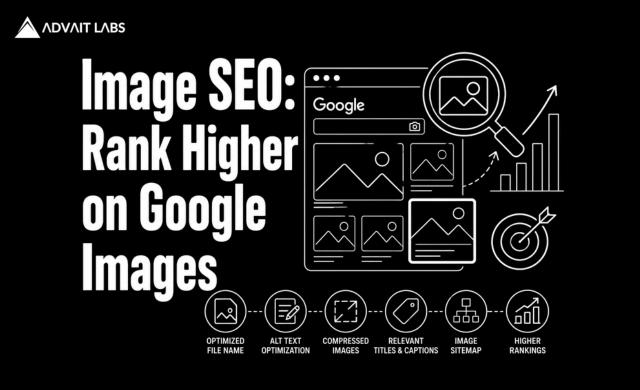
Image SEO is no longer just about adding pictures to your website. In 2026, images play a significant role in improving search visibility, enhancing user experience, driving traffic from Google Image Search, and supporting AI-powered search engines. Properly optimized visuals help search engines understand your content while improving page speed, accessibility, and engagement. Businesses that ignore image optimization often miss valuable opportunities to attract qualified visitors through image search results. At Advait Technology Labs, we build SEO-friendly websites and implement advanced Image SEO strategies that improve rankings across Google Search, Google Images, AI Overviews, and other AI-powered search platforms. This guide explains how to optimize your images for maximum visibility and better website performance.
What Is Image SEO?
Image SEO is the process of optimizing images so search engines can easily discover, understand, index, and display them in search results.
Image optimization includes:
- Descriptive file names
- Alt text
- Image compression
- Proper image formats
- Responsive images
- Structured data
- Fast loading speeds
- Contextual placement
Well-optimized images improve both traditional SEO and user experience.
Why Image SEO Matters in 2026
Images influence far more than appearance.
Proper Image SEO helps:
- Increase visibility in Google Image Search
- Improve page speed
- Support Core Web Vitals
- Enhance accessibility
- Increase organic traffic
- Improve user engagement
- Support AI-powered search engines
As visual search continues to grow, optimized images become an important source of website traffic.
How Google Understands Images
Google cannot “see” images the way humans do.
Instead, it relies on multiple signals, including:
- File names
- Alt text
- Surrounding content
- Page title
- Image captions
- Structured data
- Image metadata
- Internal links
Providing clear context helps search engines understand what an image represents.
1. Use Descriptive File Names
Many websites upload images with names like:
- IMG001.jpg
- Photo123.png
- Screenshot1.webp
These names provide no useful information.
Instead, use descriptive filenames such as:
- image-seo-guide.webp
- technical-seo-audit.webp
- website-speed-optimization.webp
Include relevant keywords naturally without stuffing them.
2. Write Meaningful Alt Text
Alt text serves two important purposes:
- Improves accessibility for screen readers.
- Helps search engines understand image content.
Good alt text should:
- Describe the image accurately
- Include keywords naturally
- Remain concise
- Avoid keyword stuffing
Example:
Good:
“SEO specialist performing an Image SEO audit on a website.”
Poor:
“Image SEO Image SEO Google Images SEO image optimization.”
3. Choose the Right Image Format
Different formats serve different purposes.
Common choices include:
WebP
- Smaller file size
- Excellent quality
- Recommended for most websites
JPEG
- Good for photographs
- Small file sizes
- Widely supported
PNG
- Ideal for graphics requiring transparency
- Larger file sizes
SVG
- Best for logos and icons
- Scales without losing quality
Selecting the appropriate format improves loading speed.
4. Compress Images
Large image files slow websites considerably.
Before uploading images:
- Compress file sizes
- Maintain visual quality
- Remove unnecessary metadata
- Resize images appropriately
Smaller files improve user experience and Core Web Vitals.
5. Use Responsive Images
Visitors access websites from many devices.
Responsive images automatically adjust to different screen sizes, reducing unnecessary downloads and improving mobile performance.
This supports Google’s mobile-first indexing.
6. Add Image Captions Where Helpful
Captions provide additional context for both users and search engines.
While not every image requires a caption, they can improve engagement and reinforce page relevance.
Use captions naturally rather than forcing keywords into every image.
7. Place Images Near Relevant Content
Google evaluates the relationship between images and surrounding text.
Place images close to the content they illustrate.
For example:
- A page about Core Web Vitals should include performance-related visuals.
- A page discussing website design should feature website mockups or UI examples.
Context improves image relevance.
8. Implement Image Structured Data
Structured data helps search engines understand image relationships.
Schema can be added to:
- Articles
- Products
- Recipes
- Services
- FAQs
Structured data increases the likelihood of enhanced search results.
9. Optimize Image Loading
Improve loading performance by:
- Lazy loading below-the-fold images
- Using browser caching
- Serving images through a CDN
- Optimizing server response time
These improvements contribute to faster page speed and better user experience.
10. Create Original Images
Original visuals provide greater value than generic stock images.
Examples include:
- Infographics
- Charts
- Product images
- Team photos
- Custom illustrations
- Process diagrams
Unique images help differentiate your content and improve brand recognition.
Best Tools for Image SEO
Several tools simplify image optimization.
Popular options include:
- Google PageSpeed Insights
- Google Search Console
- Lighthouse
- TinyPNG
- Squoosh
- ImageOptim
- GTmetrix
- Screaming Frog SEO Spider
Regular audits help identify optimization opportunities.
Final Thoughts
Image SEO is an essential part of modern website optimization. Properly optimized images improve Google Image Search visibility, enhance page speed, strengthen accessibility, and contribute to better search rankings.
As search engines and AI-powered platforms continue to evolve, businesses that invest in image optimization gain an advantage through improved user experience, stronger technical SEO, and increased organic traffic.
If you’re looking to optimize your website for better visibility and faster performance, Advait Technology Labs can help you implement a complete Image SEO strategy that supports long-term digital growth.
Visit Advait Technology Labs Today!
Frequently Asked Questions
What is Image SEO?
Image SEO is the process of optimizing images using descriptive filenames, alt text, compression, structured data, and responsive design to improve visibility in search engines and Google Image Search.
Why is Image SEO important?
Image SEO improves website performance, enhances accessibility, increases organic traffic from Google Images, supports Core Web Vitals, and strengthens overall SEO.
Does Image SEO improve Google rankings?
While images alone do not determine rankings, optimized images contribute to faster page speed, better user experience, and stronger technical SEO, all of which support higher search visibility.
Which image format is best for SEO?
WebP is generally the preferred format because it provides excellent image quality with smaller file sizes. JPEG is suitable for photographs, PNG is useful for transparent graphics, and SVG works well for logos and icons.
