
Technical SEO Checklist: 15 Issues Silently Killing Your Rankings
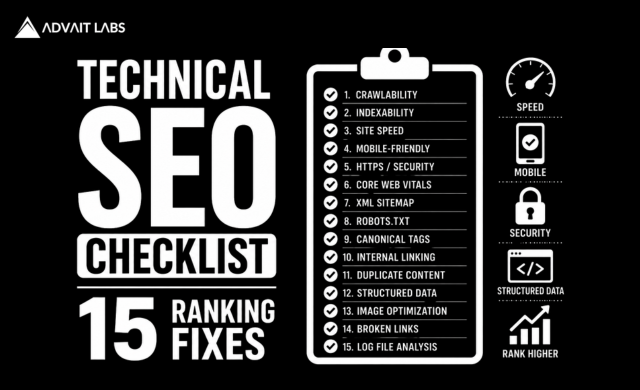
Technical SEO Checklist should be part of every website owner’s SEO strategy. You can publish exceptional content and build high-quality backlinks, but if your website has technical issues, Google may struggle to crawl, index, and rank your pages. Many businesses unknowingly lose valuable organic traffic because of problems that remain hidden behind the scenes.
Technical SEO forms the foundation of your website’s performance. Search engines need to access, understand, and index your content efficiently before it has a chance to rank. Issues like broken links, slow page speed, poor mobile usability, crawl errors, duplicate content, and missing structured data can silently reduce your visibility in search results.
At Advait Technology Labs, we help businesses identify and resolve technical SEO problems through comprehensive website audits. In this guide, we’ll cover a practical Technical SEO Checklist with 15 common issues that could be preventing your website from reaching its full ranking potential.
What Is a Technical SEO Checklist?
A Technical SEO Checklist is a structured list of technical factors that help ensure your website can be properly crawled, indexed, understood, and ranked by search engines.
It focuses on optimizing your website’s infrastructure rather than its content.
A comprehensive checklist typically includes:
- Crawlability
- Indexability
- Website speed
- Mobile usability
- Site architecture
- Security
- Structured data
- Core Web Vitals
- Internal linking
- XML sitemaps
Technical SEO creates the foundation that supports all other SEO efforts.
Why Technical SEO Matters
Even the best content cannot rank if search engines cannot access or understand it.
Technical SEO helps:
- Improve crawl efficiency
- Increase indexation
- Enhance user experience
- Strengthen website performance
- Support higher rankings
- Reduce technical errors
- Improve conversion rates
Without a technically healthy website, SEO performance often reaches a plateau.
1. Slow Website Speed
Website speed directly impacts both user experience and SEO.
Slow-loading websites often experience:
- Higher bounce rates
- Lower engagement
- Reduced conversions
- Poor Core Web Vitals
Optimize:
- Images
- JavaScript
- CSS
- Hosting
- Browser caching
2. Poor Mobile Optimization
Google primarily evaluates your mobile website.
Check for:
- Responsive design
- Readable text
- Touch-friendly navigation
- Proper spacing
- Mobile page speed
A poor mobile experience negatively affects rankings.
3. Core Web Vitals Issues
Monitor Google’s Core Web Vitals metrics:
- Largest Contentful Paint (LCP)
- Interaction to Next Paint (INP)
- Cumulative Layout Shift (CLS)
Improving these metrics creates a better user experience and supports SEO performance.
4. Broken Internal Links
Broken links interrupt crawling and frustrate users.
Regularly identify and fix:
- Broken navigation links
- Missing pages
- Incorrect URLs
- Redirect errors
Healthy internal linking improves crawlability.
5. Crawl Errors
Google Search Console often reports:
- 404 errors
- Server errors
- Blocked resources
- Redirect problems
Resolving crawl errors helps search engines discover and index your content more efficiently.
6. Duplicate Content
Duplicate pages confuse search engines.
Common causes include:
- URL parameters
- Multiple page versions
- Printer-friendly pages
- HTTP and HTTPS duplicates
Use canonical tags where appropriate.
7. Missing XML Sitemap
Your XML sitemap helps search engines discover important pages.
Ensure it:
- Includes indexable pages
- Excludes redirects
- Excludes noindex pages
- Updates automatically
Submit it through Google Search Console.
8. Incorrect Robots.txt Configuration
Robots.txt controls crawler access.
Avoid accidentally blocking:
- Service pages
- Blog articles
- Landing pages
- Important resources
Review your robots.txt file after major website updates.
9. Missing Structured Data
Structured data helps search engines understand your content.
Consider implementing Schema for:
- Articles
- FAQs
- Services
- Organizations
- Products
- Reviews
- Breadcrumbs
Structured data also supports rich search results.
10. Weak Internal Linking
Internal links distribute authority throughout your website.
A strong linking strategy helps:
- Improve crawlability
- Build topical authority
- Support user navigation
- Strengthen related content
Every important page should receive internal links.
11. Orphan Pages
Orphan pages have no internal links pointing to them.
Without internal links, search engines may never discover these pages.
Regular content audits help identify orphan pages.
12. Redirect Chains and Loops
Multiple redirects slow crawling.
Whenever possible:
- Use direct redirects
- Remove unnecessary redirect chains
- Eliminate redirect loops
Efficient redirects improve both SEO and user experience.
13. HTTPS and Website Security
Google expects websites to use HTTPS.
Check for:
- SSL certificate validity
- Mixed content warnings
- Secure resource loading
Security builds both user trust and search engine confidence.
14. Thin or Low-Value Pages
Low-quality pages consume crawl budget and reduce overall website quality.
Review pages with:
- Very little content
- Duplicate information
- Outdated resources
- No search value
Merge, improve, or remove them where appropriate.
15. Missing Meta Titles and Descriptions
Metadata helps search engines understand page relevance.
Every important page should have:
- Unique title tags
- Compelling meta descriptions
- Relevant keywords
- Clear messaging
Well-written metadata also improves click-through rates.
How Often Should You Perform a Technical SEO Audit?
Technical SEO is not a one-time task.
Businesses should perform audits:
- Quarterly for most websites
- Monthly for large websites
- After website redesigns
- Following major Google algorithm updates
- Before launching new sections
Regular audits help detect issues before they impact rankings.
Final Thoughts
A Technical SEO Checklist helps businesses identify hidden issues that can silently reduce search rankings, traffic, and conversions. While content remains essential, technical SEO ensures search engines can efficiently discover, understand, and index your website.
By regularly reviewing website speed, mobile usability, crawlability, structured data, internal linking, and other technical factors, businesses can strengthen their SEO performance and prepare for the future of AI-powered search.
If you’re unsure whether technical issues are limiting your website’s growth, Advait Technology Labs can perform a comprehensive technical SEO audit and help you build a faster, healthier, and more search-friendly website.
Visit Advait Technology Labs Today!
Frequently Asked Questions
What is a Technical SEO Checklist?
A Technical SEO Checklist is a list of technical improvements that help search engines crawl, index, and rank your website more effectively.
How often should I complete a Technical SEO Checklist?
Most businesses should perform a technical SEO audit every three to six months or after significant website updates and Google algorithm changes.
Does technical SEO improve Google rankings?
Yes. Technical SEO improves crawlability, indexability, website speed, mobile usability, and user experience, all of which contribute to better search performance.
Which tools are best for technical SEO audits?
Google Search Console, Google Analytics 4, Google PageSpeed Insights, Screaming Frog SEO Spider, Ahrefs, SEMrush, and GTmetrix are among the most commonly used tools.
